
Supreme Niu Niu Top-Up: VPay & SecurePay Guide
You can top up Supreme Niu Niu from the platform's top-up page using VPay or SecurePay. The current minimum top-up is RM100. Depending on the method you choose, you can pay with P2P online banking transfer, DuitNow, Touch ’n Go, or the FPX and e-wallet options offered by SecurePay. After you submit your top-up, the system redirects you to the matching payment page, where you must complete payment within the time limit. Once payment succeeds, your balance is credited automatically.
至尊牛牛 Deposit Methods
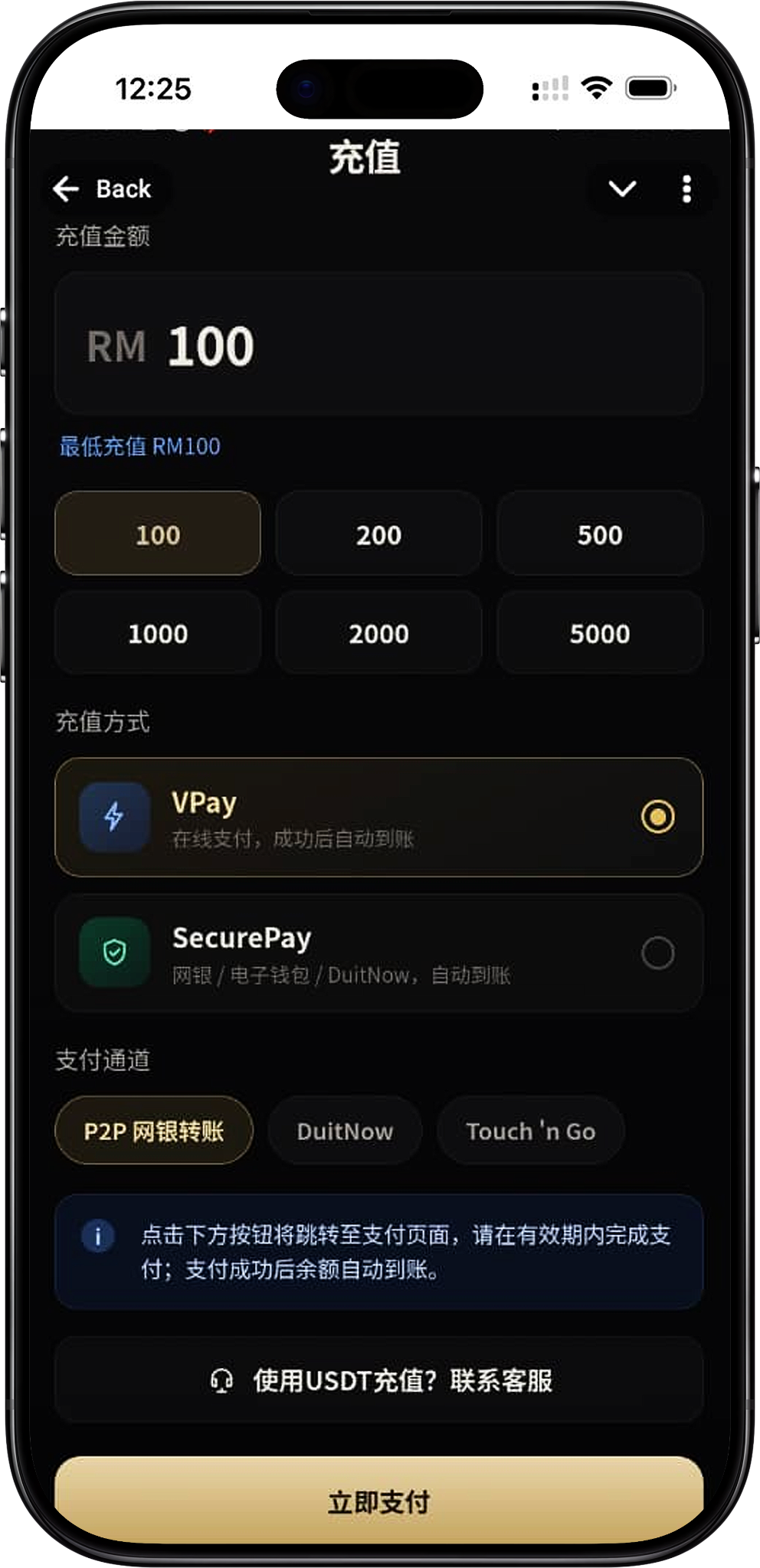
The Supreme Niu Niu top-up page currently offers two methods: VPay and SecurePay. VPay is an online payment method, and you continue to pay through the channels shown on the page. SecurePay offers online banking, e-wallet and DuitNow options. Choose whichever top-up channel suits you from the methods actually available on the page.
VPay
VPay supports online payment, and your balance is credited automatically once payment is complete. On the Supreme Niu Niu top-up page, you can choose a channel under VPay, such as P2P online banking transfer, DuitNow or Touch ’n Go, then continue to the matching payment page to finish the transaction.
SecurePay
SecurePay supports online banking, e-wallets and DuitNow. After you select SecurePay and click "Pay Now", you'll enter the SecurePay checkout, where you can choose FPX, E-Wallet or DuitNow as needed to complete payment.
FPX Online Banking
FPX lets you pay online through a supported bank account. The SecurePay FPX page shows a list of banks; select yours and follow your bank's payment steps. The banks actually available are as shown on the payment page at the time.
E-Wallet
The E-Wallet option on SecurePay shows the e-wallets currently supported. The options shown include Boost, GrabPay, ShopeePay and Touch ’n Go, but the e-wallets actually available are as displayed on the SecurePay page at the time of payment.
DuitNow
DuitNow is available as a top-up payment option. Depending on the top-up method you choose, you may be taken to a DuitNow instant transfer or QR code payment page, and you must complete the transaction within the time limit shown on the page.
至尊牛牛 Deposit Amounts and Basic Requirements
The current minimum top-up for Supreme Niu Niu is RM100. The top-up page offers popular amounts to choose from, or you can enter an amount within the range the page allows. Once you've confirmed the amount, select VPay or SecurePay and the matching payment channel to pay.
Minimum Top-Up RM100
The current minimum top-up for Supreme Niu Niu is RM100. If the amount you enter is below the minimum, the top-up can't be submitted through the normal process, so make sure your amount meets the minimum shown on the page first.
Popular Top-Up Amounts
The top-up page offers quick-select amounts such as RM100, RM200, RM500, RM1,000, RM2,000 and RM5,000. Some top-up methods also show a per-transaction limit, and the range you can actually submit is as shown on the top-up page at the time.
Confirm the Amount Before Choosing a Payment Method
The top-up amount carries over to the next payment page, so before clicking "Pay Now", check that the amount is correct and that you've selected the top-up method and payment channel you want to use.
至尊牛牛 Deposit Steps
The Supreme Niu Niu top-up process consists of opening the top-up page, entering an amount, choosing VPay or SecurePay, selecting a payment channel, being redirected to pay, and waiting for your balance to be credited automatically. The checkout page differs by payment method, but the overall process is the same.
Step 1: Open the Supreme Niu Niu Top-Up Page
After logging in to Supreme Niu Niu, go to the "Top-Up" page. It shows the top-up amount, the minimum top-up requirement, the top-up methods and the payment channels currently available.
Step 2: Enter or Select a Top-Up Amount
Enter the RM amount you want to top up, or pick one of the quick-select amounts on the page, such as RM100, RM200, RM500, RM1,000, RM2,000 or RM5,000. The top-up amount can't be lower than the RM100 minimum currently shown.
Step 3: Choose VPay or SecurePay
Under "Top-up method," choose VPay or SecurePay. The page will then show the payment instructions for that method and the payment channels you can continue with.
Step 4: Choose a payment channel
Choose from the payment channels available for your selected top-up method. For example, on the VPay page you can pick P2P online banking transfer, DuitNow or Touch ’n Go; with SecurePay, you can choose FPX, E-Wallet or DuitNow at the checkout after the redirect.
Step 5: Click Pay Now
After confirming the top-up amount, method and payment channel, click "Pay Now." You'll be redirected to the relevant third-party payment page, which shows the order amount due and the payment options.
Step 6: Complete payment on the payment page
Follow the prompts on the third-party payment page to complete the transaction. For FPX, select your bank and continue with online banking payment; for e-wallets, select the relevant wallet; for DuitNow or Touch ’n Go QR codes, follow the on-page instructions to scan and pay.
Step 7: Wait for your balance to be credited automatically
Once payment succeeds, the system processes your top-up automatically and adds it to your 至尊牛牛 account balance. Don't resubmit the same transaction before payment is complete, to avoid unnecessary duplicate orders.
Deposit with VPay
VPay is one of the online payment methods available on the 至尊牛牛 top-up page. After selecting VPay, you can continue with payment through the currently available channels, and your balance is credited automatically once payment succeeds.
VPay P2P online banking transfer
After selecting VPay, you can use the P2P online banking transfer channel. Click "Pay Now" to open the payment page, choose your bank from the options shown, and complete the transaction by following your online banking payment steps.
VPay DuitNow
After selecting DuitNow under VPay and entering the payment page, the system generates DuitNow payment details or a QR code for your top-up amount. The page shows a validity period, so you need to complete payment before the QR code expires.
VPay Touch ’n Go
VPay supports payment through the Touch ’n Go channel. Once on the payment page, follow the on-screen instructions to scan the QR code with Touch ’n Go eWallet and pay the specified amount. The QR code has a validity period, so complete payment within the time shown on the page.
VPay payment time limit
VPay's third-party payment page may show the time remaining for your transaction. If you don't complete payment in time, the payment may be cancelled or the QR code may expire. If so, return to the top-up page and start a new transaction.
Deposit with SecurePay
SecurePay is another top-up method offered by 至尊牛牛, supporting online banking, e-wallets and DuitNow. After selecting SecurePay and clicking "Pay Now," the system redirects you to the SecurePay checkout, which shows the order amount and the payment options currently available.
SecurePay FPX
After selecting FPX at the SecurePay checkout, choose your bank from the bank list, then follow the FPX and bank page instructions to complete payment. The page may show several Malaysian banks, but the actual supported list is the SecurePay bank list at the time of payment.
SecurePay E-Wallet
After selecting E-Wallet, choose a payment method from the e-wallets SecurePay currently offers. The page shows Boost, GrabPay, ShopeePay and Touch ’n Go. Once you choose, continue with that e-wallet's payment flow.
SecurePay DuitNow
SecurePay also offers DuitNow Instant Transfer. Select DuitNow, confirm the relevant terms, then follow the checkout instructions to submit and complete your payment.
SecurePay Order Amount
Once you enter SecurePay, the page shows the amount and details of this top-up order. Before paying, double-check that the amount displayed matches what you submitted on the 至尊牛牛 top-up page, then choose a payment method to continue.
至尊牛牛 Deposit Arrival and Payment Notes
至尊牛牛 top-ups are credited automatically once payment succeeds. Because the payment itself is completed through the relevant payment channel, check the amount, payment method, order status and page validity time during top-up, and rely on the information shown on the current payment page.
Auto-Credited After Successful Payment
The top-up pages for both VPay and SecurePay state that your balance is credited automatically after successful payment. After paying, go back to your account to check your balance and transaction result first, and avoid paying again while the system is still processing the transaction.
Don't Exceed the Payment Page Time Limit
DuitNow QR codes and some third-party payment orders have an expiry time. If the page shows a countdown, complete your payment within the time given. Once an order or QR code expires, start a new top-up from the 至尊牛牛 top-up page.
Check Your Top-Up Amount Before Paying
After being redirected to a VPay, SecurePay, FPX, DuitNow or e-wallet page, confirm that the RM amount shown matches the top-up amount you originally submitted, then continue to complete your payment.
Top Up with USDT
The 至尊牛牛 top-up page also has a "Top up with USDT? Contact Customer Service" option. If you want to use USDT, get the instructions through the customer service channel provided by the platform, and don't transfer to unverified addresses or by unverified methods.
至尊牛牛 Deposit FAQs
What Is the Minimum Top-Up Amount for 至尊牛牛?
The current minimum top-up amount is RM100. When topping up, rely on the minimum amount and per-transaction limit shown on the 至尊牛牛 top-up page.
What Top-Up Methods Does 至尊牛牛 Offer?
VPay and SecurePay are currently the main options. Depending on the method you choose, you can also use payment channels such as P2P online banking transfer, FPX, DuitNow, Touch ’n Go or e-wallets.
Can I Top Up with FPX?
Yes. SecurePay offers an FPX payment option. After entering the SecurePay checkout, you can choose from the currently supported banks to complete your payment.
Can I Top Up with Touch ’n Go?
Yes. The VPay page offers a Touch ’n Go payment channel, and under SecurePay's E-Wallet option you can also choose Touch ’n Go, depending on the methods shown on the current payment page.
Which E-Wallets Does SecurePay Support?
The E-Wallet options currently shown include Boost, GrabPay, ShopeePay and Touch ’n Go. Payment service availability may change with the checkout's status, so rely on what the actual payment page shows.
Can I Use DuitNow to Top Up?
Yes. Both VPay and SecurePay offer DuitNow-related payment methods, and the exact payment flow depends on the payment service you choose.
Do I Need to Submit My Top-Up Manually After Paying?
Normally not needed. The page states that your balance is credited automatically after a successful payment. Once you've paid, return to your 至尊牛牛 account to confirm your balance.
What if my DuitNow QR code expires?
If your DuitNow QR code or current payment order has passed its validity period, don't use the expired QR code to pay. Go back to the 至尊牛牛 deposit page, choose your amount and payment method again, then generate a new payment order.
Can I deposit with USDT?
The deposit page includes a customer service link for USDT deposits. If you want to use USDT, contact platform customer service first and follow their specific instructions.
Start Your 至尊牛牛 Deposit
Go to the 至尊牛牛 deposit page, choose your deposit amount, VPay or SecurePay, then complete payment through any currently available online banking, DuitNow, Touch ’n Go or e-wallet option.