
Supreme Niu Niu Withdrawal: Touch ’n Go eWallet Guide
Supreme Niu Niu withdrawals go to your linked Touch ’n Go eWallet account by default, with a minimum withdrawal of RM100. Your first 2 withdrawals each day are free; from the 3rd onward, a 3% fee of the withdrawal amount applies to each one. On the withdrawal page, confirm your payout account, withdrawable balance and remaining free withdrawals, then enter an amount and submit. Eligible orders are processed automatically; others go to finance review, which usually takes 1–24 hours.
- 1. 至尊牛牛 Withdrawal Methods and Basic Rules
- 2. 至尊牛牛 Withdrawal Steps
- 3. Touch ’n Go eWallet Payout Account
- 4. 至尊牛牛 Withdrawal Amount and Withdrawable Balance
- 5. Supreme Niu Niu Withdrawal Limits and Fees
- 6. Supreme Niu Niu Withdrawal Review and Arrival Time
- 7. Supreme Niu Niu USDT Withdrawals
- 8. Supreme Niu Niu Withdrawal FAQs
至尊牛牛 Withdrawal Methods and Basic Rules
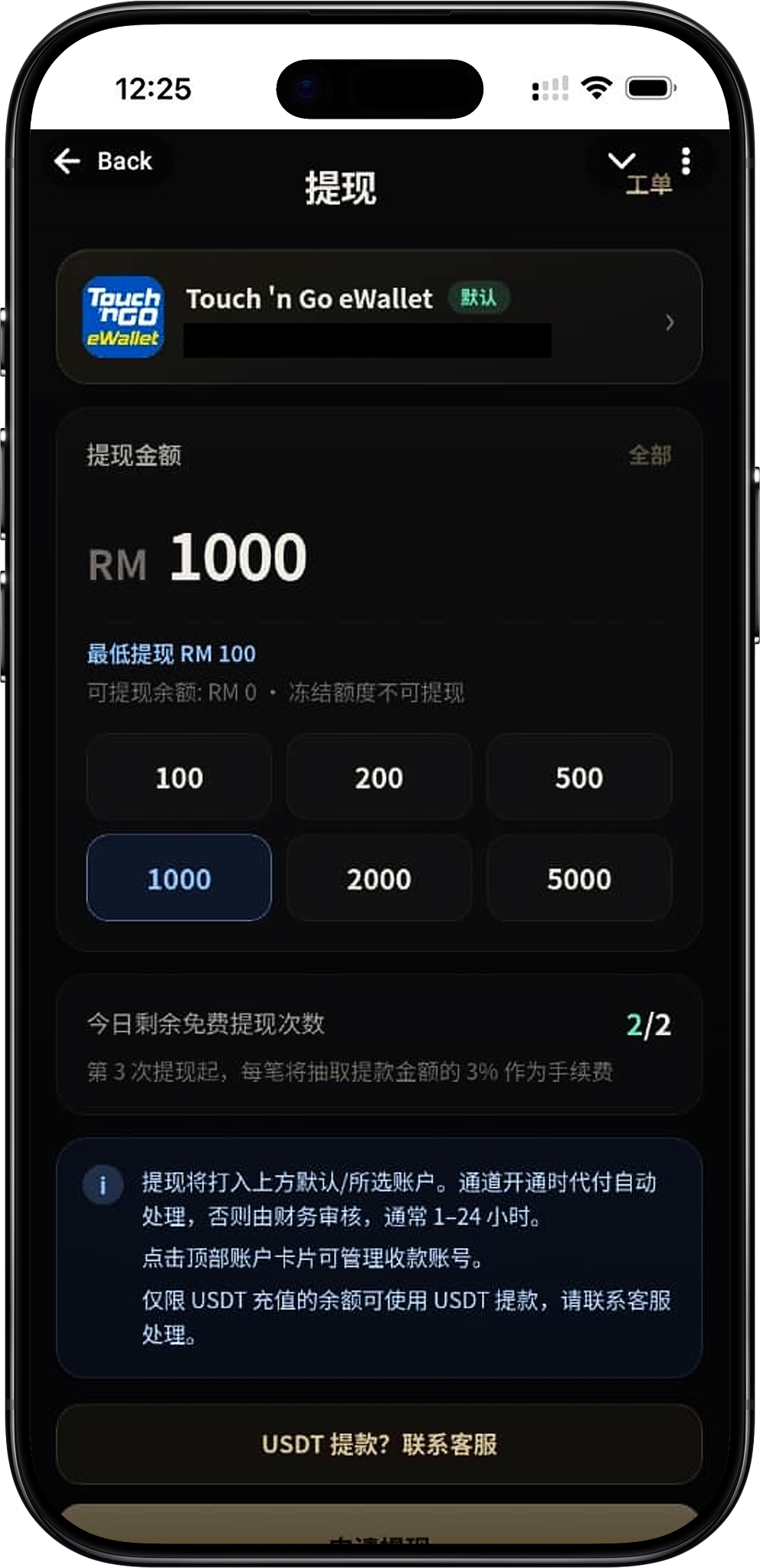
Supreme Niu Niu currently processes standard withdrawals to your linked Touch ’n Go eWallet account by default. On the withdrawal page, you can see your default payout account, minimum withdrawal, withdrawable balance, frozen amount and the free withdrawals left today. Check that your account details and amount are correct before submitting, to avoid extra review caused by mismatched details or withdrawal conditions.
Touch ’n Go eWallet by default
The withdrawal page shows your linked Touch ’n Go eWallet and marks the default payout account. Standard withdrawal requests are processed using the payout details currently linked, so check that the displayed account is correct before you submit.
Minimum withdrawal RM100
The minimum withdrawal on Supreme Niu Niu is currently RM100. The amount you enter must meet this minimum and cannot exceed the withdrawable balance shown on the page.
2 free withdrawals per day
The first 2 withdrawals per account each day are fee-free. The withdrawal page shows "Free withdrawals left today", so you can check how many free withdrawals remain before you submit.
3% fee from the 3rd withdrawal
From the 3rd withdrawal of the day, each withdrawal is charged a fee of 3% of the withdrawal amount. Before submitting several withdrawals in a row, check your remaining free withdrawals for the day and the related fees.
至尊牛牛 Withdrawal Steps
The Supreme Niu Niu withdrawal process includes opening the withdrawal page, confirming your Touch ’n Go eWallet payout account, checking your withdrawable balance, entering the amount, reviewing free withdrawals and fees, then submitting your request. The system then processes it automatically or sends it to finance review, depending on your account and order.
Step 1: Open the Supreme Niu Niu withdrawal page
After logging in to Supreme Niu Niu, open "Withdraw" from the platform's feature menu. The page shows your current default Touch ’n Go eWallet payout account at the top.
Step 2: Confirm your Touch ’n Go eWallet payout account
Check that the Touch ’n Go eWallet account shown at the top is the payout account you want to use. To manage your payout account, tap the account card at the top to open the account management page.
Step 3: Check your withdrawable balance
Before entering an amount, check the "Withdrawable balance" shown on the page. Frozen funds can't be withdrawn, so the amount you can request is based on your current withdrawable balance, not on other balances displayed in your account.
Step 4: Enter the withdrawal amount
Enter the RM amount you want to withdraw, or use the quick amounts on the page, such as RM100, RM200, RM500, RM1,000, RM2,000 or RM5,000. The minimum request is RM100, and it can't exceed your current withdrawable balance.
Step 5: Check free withdrawals and fees
Before submitting, check "Free withdrawals left today". The first 2 withdrawals each day are free; once they're used up, each withdrawal from the 3rd onward is charged a fee of 3% of the withdrawal amount.
Step 6: Tap Request Withdrawal
After confirming your payout account, withdrawal amount and fees, tap "Request Withdrawal" to submit your order. Double-check your details before submitting so payout account or amount issues don't hold up processing.
Step 7: Wait for processing and arrival of funds
Withdrawals are sent to your current default or selected payout account. Eligible requests are processed automatically; if they don't meet the auto-processing conditions, they go to finance review, which the platform says usually takes 1–24 hours.
Touch ’n Go eWallet Payout Account
Touch ’n Go eWallet is the default payout method for standard withdrawals at 至尊牛牛. The withdrawal page shows your linked account directly, so you can confirm your payout details before submitting and manage your payout account from the account card.
View the Default Payout Account
The Touch ’n Go eWallet card at the top of the page shows your currently linked account and marks the default withdrawal account with a "Default" label. Withdrawals are processed to the payout account you've selected or set as default.
Manage Your Payout Account
Tap the account card at the top of the withdrawal page to manage your payout account. If your account details need changing, complete that first, then submit a new withdrawal request.
Check Your Account Details Before Submitting
Withdrawals transfer real money, so make sure your Touch ’n Go eWallet payout details are correct before you apply. If anything looks wrong or you can't manage your account properly, contact platform customer support first.
至尊牛牛 Withdrawal Amount and Withdrawable Balance
At 至尊牛牛, the amount you can request isn't based on the account balance shown on the page, but on your "withdrawable balance." The page also notes that frozen funds can't be withdrawn, so use the withdrawable balance actually displayed as your guide when applying.
Minimum Withdrawal
The minimum is RM100 per withdrawal. Amounts below RM100 don't meet the current minimum requirement, so reach the minimum before submitting a request.
Withdrawable Balance
"Withdrawable balance" is the amount currently available for withdrawal requests. The amount you request can't exceed the withdrawable balance shown live on the page.
Frozen Funds Can't Be Withdrawn
The page clearly states that frozen funds can't be withdrawn. If part of your funds are frozen, that portion isn't counted toward your withdrawable amount, so go by the actual figure shown on the system page.
Quick Withdrawal Amounts
The withdrawal page offers quick-select amounts such as RM100, RM200, RM500, RM1,000, RM2,000 and RM5,000. You can also enter your own amount within the range the page allows.
至尊牛牛 Withdrawal Limits and Fees
At 至尊牛牛, fees are based on the number of withdrawals you make each day. The first 2 withdrawals each day are free; from the 3rd onward, each withdrawal is charged a fee of 3% of the withdrawal amount. The page shows how many free withdrawals you have left today, so you can check the fees before submitting.
1st Withdrawal
Your 1st withdrawal of the day counts as a free withdrawal. As long as other withdrawal requirements are met, no 3% fee applies based on withdrawal count.
2nd Withdrawal
Your 2nd withdrawal of the day is also free. Once it's done, both of your free withdrawals for the day have been used.
3rd Withdrawal and Beyond
From the 3rd withdrawal of the day, each withdrawal is charged a 3% fee on the withdrawal amount. You can estimate the possible fee from your withdrawal amount before applying, but the figure shown at submission is what applies.
How to Check Your Remaining Free Withdrawals
Below the withdrawal amount field, you'll see "Free withdrawals left today." For example, 2/2 means you still have 2 free withdrawals available today. The number updates as you make withdrawals during the day.
至尊牛牛 Withdrawal Review and Arrival
After you submit a Supreme Niu Niu withdrawal request, the system processes it based on your account details, withdrawal conditions and order status. Eligible withdrawals can be handled automatically, while others may go to finance review, so actual arrival times can vary from order to order.
Automatic processing when eligible
According to the platform's withdrawal page, funds are sent to your default or selected account, and eligible orders are processed automatically while the channel is open. After submitting, keep an eye on your order status and your receiving account for the funds.
Finance review
If a withdrawal order can't be processed automatically, it may be reviewed by the finance team. While it's under review, avoid submitting the same request again and wait for the order status to update.
Usually takes 1–24 hours
For withdrawals that need finance review, the platform page states that it usually takes 1–24 hours. The actual processing time depends on the specific order status and the platform's review result.
Check your withdrawal tickets
The top of the withdrawal page has a "Tickets" entry for viewing your withdrawal orders and their processing status. After submitting a request, use it to check your order's progress.
至尊牛牛 USDT Withdrawal
The Supreme Niu Niu page also has a separate USDT withdrawal support entry, but the balance eligible for USDT withdrawals differs from that for standard Touch ’n Go eWallet withdrawals. If you need to withdraw via USDT, first confirm your source of funds and follow the process provided by customer support.
USDT withdrawals require contacting support
The withdrawal page offers a "USDT withdrawal? Contact support" entry. If you need to withdraw via USDT, get the exact instructions through the platform's customer support channel.
USDT deposit balance only
The platform page states that only balances funded through USDT deposits can be withdrawn via USDT. Other balances can't be processed directly as USDT withdrawals.
Never enter an unverified USDT address yourself
Because USDT withdrawals must be handled through customer support, follow the platform's official process to confirm your withdrawal details. Never send funds to unverified addresses or channels on your own.
至尊牛牛 Withdrawal FAQ
What's the minimum withdrawal for Supreme Niu Niu?
The current minimum withdrawal for Supreme Niu Niu is RM100. Your request must also fall within the withdrawable balance shown on the page.
Where do Supreme Niu Niu withdrawals go?
Standard withdrawals go by default to the Touch ’n Go eWallet account you've linked. Before submitting, you can confirm the default or selected account at the top of the withdrawal page.
Are there fees for Supreme Niu Niu withdrawals?
Your first 2 withdrawals each day are free. From the 3rd withdrawal of the day, a 3% fee on the withdrawal amount applies to each one.
How do I check how many free withdrawals I have left today?
The withdrawal page shows "Free withdrawals left today." For example, 2/2 means you still have 2 free withdrawals available today.
Can frozen funds be withdrawn?
No. The withdrawal page clearly states that frozen funds can't be withdrawn. The amount you can actually request is the one shown under "Withdrawable Balance."
How long does a 至尊牛牛 withdrawal take?
Eligible withdrawal orders can be processed automatically. When a finance review is needed, the platform page says it usually takes 1–24 hours. The actual arrival time depends on your order's processing status.
Can I change my Touch ’n Go eWallet payout account?
The account card at the top of the withdrawal page has an entry for managing your payout account. To update your payout details, go to account management first and follow the method the platform currently provides.
Can I withdraw using USDT?
The platform offers a customer service channel for USDT withdrawals, but USDT withdrawals are only available for balances funded by USDT deposits. Please contact platform customer service for the exact process.
Where can I check the status of my withdrawal request after submitting it?
You can check your withdrawal orders and their progress via the "Ticket" entry at the top of the withdrawal page. If an order goes into finance review, wait for the review status to update.
Request a 至尊牛牛 Withdrawal
Go to the 至尊牛牛 withdrawal page, confirm your Touch ’n Go eWallet payout account, withdrawable balance, free withdrawals remaining and withdrawal amount, then submit your request.